

Back to article
3348
Ved hjelp av knappene og berøringskontrollene
Hodetelefonene har både berøringskontroll og fysiske knapper. Bruk berøringskontroll ved å sveipe eller trykke på berøringsflaten på hodetelefonene. Berøringskontrollen gir deg mulighet til å spille av lyd eller sette den på pause, hoppe fremover eller bakover, endre volum og utføre grunnleggende anropsfunksjoner. Knappene har standardfunksjoner som støyreduksjonsnivåer og taleassistent, men du kan tilpasses knappefunksjonene i Bose-appen.
Using the buttons and touch controls | Bose QuietComfort Ultra Headphones (2nd Gen)
Headphone controls
The Multi-function button controls media playback. The volume strip controls the volume.
The Multi-function button controls phone calls. There are four microphones for phone calls on the headphones — two on the left earcup and two on the right earcup.
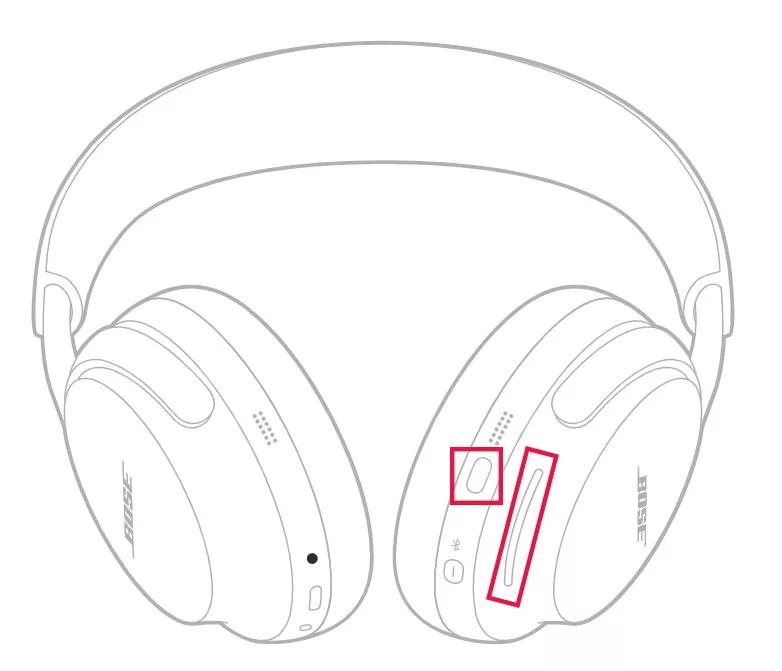
Media playback and volume
| Function | Headphones operation |
|---|---|
| Play or pause | Press the Multi-function button |
| Skip forward | Double-press the Multi-function button |
| Skip backward | Triple-press the Multi-function button |
| Volume up | Swipe up on the volume strip |
| Volume down | Swipe down on the volume strip |
Phone calls
The Multi-function button controls phone calls. There are four microphones for phone calls on the headphones — two on the left earcup and two on the right earcup.| Function | Headphones operation |
|---|---|
| Answer or end a call | Press the Multi-function button |
| End/Decline an incoming call | Double-press the Multi-function button |
| Answer second call and place the current call on hold | While on a call and a second incoming call is ringing, press the Multi-function button |
| Decline a second call and stay on the current call | While on a call and a second incoming call is ringing, double-press the Multi-function button |
Tilbakestille produktet | Bose QuietComfort Ultra hodetelefoner (2. generasjon)
Start hodetelefonene på nytt.
Denne tilbakestillingen sletter ikke produktinnstillingene.
- Hvis USB-ladekabelen eller lydkabelen er koblet til hodetelefonene, kobler du den fra.
- Koble en USB-ladekabel og lader til en stikkontakt. Du kan også koble USB-kabelen til en USB-port på en datamaskin som er slått på.
Merk: Ikke koble hodetelefonene til USB-kabelen ennå. - Trykk på og hold inne av/på-/Bluetooth®-knappen på hodetelefonene.
- Koble USB-kabelen til høyre øreklokke mens du fortsetter å holde knappen. Strømlampen på hodetelefonene blinker raskt to ganger.
- Når de er tilkoblet, venter du i to sekunder og slipper deretter av/på-/Bluetooth-knappen.
Tips: Hvis hodetelefonene ikke svarer etter dette, tilbakestiller du dem en gang til.
Var denne artikkelen nyttig?
Takk for tilbakemeldingen.